
WWE SmackDown vs Raw 2011 PPSSPP Walkthrough
WWE SmackDown vs Raw 2011 remains one of the most iconic wrestling games ever released on the PlayStation Portable (PSP). Even years after its launch, fans still enjoy playing it using the PPSSPP emulator on Android devices. The game offers an immersive wrestling experience with improved physics, engaging storylines, and a wide range of WWE superstars. If you’re looking to relive the nostalgia or experience it for the first time, this complete guide will help you understand everything about WWE SmackDown vs Raw 2011 PPSSPP ISO, including features, installation, gameplay tips, and cheat codes.

Overview of WWE SmackDown vs Raw 2011
WWE SmackDown vs Raw 2011 is a professional wrestling video game developed by Yuke’s and published by THQ. It introduced a brand-new physics system that made matches more realistic and interactive. Players can use weapons, interact with the environment, and perform advanced moves that were not possible in previous versions.
The game also features the popular “Road to WrestleMania” mode, where players can follow unique storylines with different WWE superstars. Additionally, the improved Universe Mode allows players to create their own WWE shows, rivalries, and championship matches.
Features of WWE SmackDown vs Raw 2011 PPSSPP
Here are some of the key features that make this game a fan favorite:
1. Advanced Physics Engine
The new physics system allows players to interact with objects more realistically. Tables, ladders, and chairs can be used strategically during matches.
2. Road to WrestleMania Mode
Experience story-driven gameplay with multiple superstars. Each storyline offers unique challenges and cutscenes.
3. WWE Universe Mode
Create your own WWE experience by managing shows, rivalries, and championships.
4. Large Roster of Superstars
Play as your favorite WWE superstars including John Cena, The Undertaker, Randy Orton, Edge, Rey Mysterio, and many more.
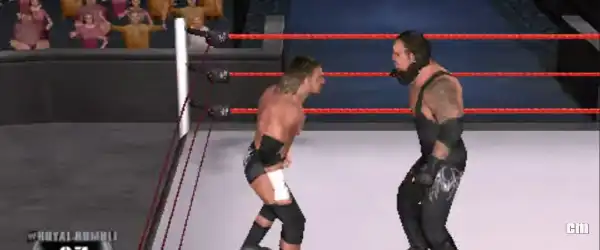
5. Improved Graphics on PPSSPP
With the PPSSPP emulator, you can enhance graphics, resolution, and performance beyond the original PSP version.
How to Download and Install WWE SmackDown vs Raw 2011 on Android
Follow these simple steps to install the game on your Android device:
Step 1: Download Required Files
- PPSSPP Emulator
- WWE SmackDown vs Raw 2011 ISO file
- Optional: Save Data and Texture files
Step 2: Install PPSSPP Emulator
Download and install the PPSSPP emulator from the Play Store or official website.
Step 3: Extract the ISO File
Use ZArchiver or any file manager to extract the downloaded ZIP/RAR file.

Step 4: Move ISO File
Place the extracted ISO file in a folder where you can easily access it.
Step 5: Launch the Game
Open PPSSPP, locate the ISO file, and tap on it to start the game.
Best PPSSPP Settings for Smooth Gameplay
To get the best performance on Android, use these settings:
Graphics Settings:
- Rendering Resolution: 2x PSP or higher
- Frame Skipping: Off
- Texture Scaling: On
- Hardware Transform: On
System Settings:
- Fast Memory: Enabled
- Multithreaded: Enabled
These settings will help you achieve smooth gameplay with improved graphics.
WWE SmackDown vs Raw 2011 Cheat Codes
Cheat codes add more fun to the game by unlocking superstars, arenas, and abilities. Here are some popular cheat codes:
Unlockable Superstars
- The Rock – Enter code:
THE GREAT ONE - Stone Cold Steve Austin –
AUSTIN 3:16
Unlock Arenas
- Classic Arena –
HISTORIC
Money/Points Cheats
- Max out your in-game currency using CWCheat codes in PPSSPP.
How to Use Cheat Codes in PPSSPP
Follow these steps to enable cheat codes:
- Open PPSSPP Emulator
- Go to Settings > System
- Enable “Cheats” option
- Launch the game
- Open the PPSSPP menu during gameplay
- Go to Cheats and add new codes
- Enable the cheats and resume the game
Gameplay Tips for Beginners
If you’re new to WWE SmackDown vs Raw 2011, here are some helpful tips:

1. Learn Basic Controls
Spend time practicing grapples, strikes, and reversals to improve your gameplay.
2. Master Reversals
Timing is key. Reversing your opponent’s moves can give you a big advantage.
3. Use Environment
Use tables, ladders, and steel chairs to dominate your opponent.
4. Build Momentum
Perform combos and signature moves to fill your finisher meter quickly.
5. Play Universe Mode
Create your own WWE storylines and enjoy endless gameplay possibilities.
Advantages of Playing on PPSSPP
Playing WWE SmackDown vs Raw 2011 on PPSSPP has several benefits:

- Better graphics and resolution
- Save and load anytime
- Custom controls
- Smooth performance on modern devices
Common Issues and Fixes
Game Lag
- Reduce resolution in PPSSPP settings
- Enable frame skipping
Black Screen
- Change graphics backend (OpenGL/Vulkan)
Crash Issues
- Use updated PPSSPP version
- Re-download ISO file if corrupted
Why WWE SmackDown vs Raw 2011 is Still Popular
Despite being an older game, WWE SmackDown vs Raw 2011 continues to attract players due to its engaging gameplay, realistic physics, and nostalgic value. The ability to play it on Android devices using PPSSPP makes it even more accessible.

Conclusion
WWE SmackDown vs Raw 2011 PPSSPP ISO is a must-play game for wrestling fans. With its advanced gameplay mechanics, exciting game modes, and legendary WWE superstars, it offers hours of entertainment. By following this guide, you can easily download, install, and enjoy the game on your Android device.
Whether you want to relive childhood memories or explore one of the best wrestling games ever made, WWE SmackDown vs Raw 2011 on PPSSPP is the perfect choice. Don’t forget to try cheat codes and optimize your settings for the best gaming.